Centerstage
A small tiling window manager for Linux that you can drive with the mouse.
Every window stays open and visible. One window sits large in the center of the screen; the rest stack in a column on either side. Click any side window and it swaps places with the one in the center. Drag the edge between any two windows to resize them, and everything else shuffles to stay tidy.
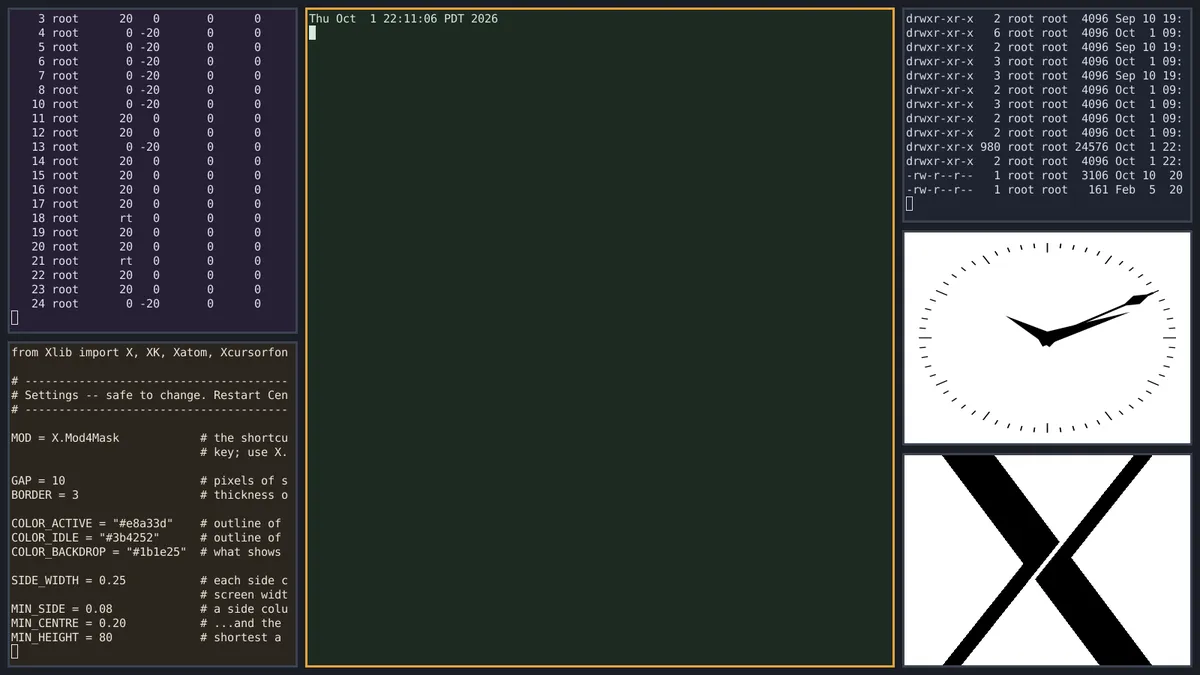
Status: experimental. It runs inside a test window on your existing desktop. It is not yet set up to be your everyday login session. See Known limits.
Offered as-is. This is a personal project, shared in case it is useful to someone else. There is no support and no promise of updates or fixes. You are welcome to use it, take it apart, and change it to suit yourself.
How it behaves
- Swap on focus. Make a side window active and it trades places with the center window. Nothing else moves.
- New windows open in the center. The window that was there takes a new slot at the side.
- Closing the center window brings the window you used most recently into the center.
- Closing a side window moves the last window in line into the empty slot, so only one window changes position.
- Resizing. Drag the edge between the center and a side column to change the column's width. Drag the edge between two stacked windows to change their heights. Neighbors take up the slack; nothing overlaps.
- Dialogs (save prompts, pop-ups, fixed-size windows) float above the tiles instead of being tiled.
- No title bars. Windows have a thin outline: amber for the active window, gray for the others.
Side slots fill alternately, right column first, then left, each column stacking from the top down.
Try it
You need Linux running X11 (Linux Mint with Cinnamon works out of the box), plus two small packages:
sudo apt install xserver-xephyr python3-xlib
Put centerstage.py and try-centerstage.sh in the same folder, open a terminal there, and run:
sh try-centerstage.sh
A window opens containing a separate miniature desktop run by Centerstage, with a few apps already tiled. Your real desktop is not changed. Close the window to finish.
For a bigger test window, give a size:
sh try-centerstage.sh 2400x1350
You can also resize the test window by dragging its edge.
Mouse
| Action | Result |
|---|---|
| Click a side window | It swaps into the center |
| Drag the edge between two windows | Resize them |
| Super + right-button drag, anywhere on a window | Resize from the nearest edge |
The click that swaps a window is used up by the swap. It does not also press whatever was under the pointer in that app.
Keyboard
| Keys | Action |
|---|---|
| Super+J, or Super+Tab | Bring the next window to the center |
| Super+K | Go back the other way |
| Super+= / Super± | Widen / narrow the center |
| Super+0 | Reset all sizes to even |
| Super+Enter | Open a terminal |
| Super+R | Run box: type a program's menu name or a command |
| Super+F | Fullscreen the active window, and back |
| Super+Q | Close the active window |
| Super+Shift+E | Quit Centerstage |
Super is the key with the Windows logo.
If a shortcut triggers your real desktop instead of the test window, press Ctrl+Shift once inside the test window. That locks the keyboard and mouse to it. Ctrl+Shift again releases them.
Settings
The settings are near the top of centerstage.py, each with a comment. Edit,
save, and start Centerstage again.
| Setting | What it changes | Default |
|---|---|---|
MOD |
The shortcut key: Super or Alt | Super |
GAP |
Space between windows, in pixels | 10 |
BORDER |
Thickness of the outline | 3 |
GRAB_MARGIN |
How far the resize zone reaches into each window's edge | 4 |
COLOR_ACTIVE |
Outline of the active window | #e8a33d |
COLOR_IDLE |
Outline of the other windows | #3b4252 |
COLOR_BACKDROP |
Color showing through the gaps | #1b1e25 |
SIDE_WIDTH |
Starting width of each side column, as a share of the screen | 0.25 |
The shortcut list itself is in the same block and can be edited the same way.
Known limits
- X11 only. It does not run on Wayland.
- One screen. It treats the whole display as a single screen, so it is not ready for a multi-monitor setup.
- No space reserved for a panel. Windows would cover a taskbar or dock.
- Not installable as a login session yet. For now it only runs in the test window.
- Two windows. With exactly two windows open, the main one sits on the left, not the true center. From three windows up it is centered.
- Narrow screens. Three columns leave each window quite narrow on a small laptop display.
Quirks of the test window, which would not apply to a real session:
- The first few apps are slow to appear, because the test window starts its own copies of some background services.
- Chromium-based browsers (Brave, Chrome and similar) open with a blank, throwaway profile, so they appear inside the test window.
- An app that is already running on your real desktop and only allows one copy of itself (Discord, for example) will usually bring that copy forward out there.
- Flatpak apps may not start properly.
- Background chatter from apps is saved to
test-drive.login the same folder. If something goes wrong, that file is the place to look.
What it needs
- Python 3
python3-xlib: lets Python talk to the displayxserver-xephyr: the test windowzenity: the Run box (already on Linux Mint)dbus-run-session: keeps the test window's apps separate from your real desktop (already on Linux Mint)
Tested on
Linux Mint 22.3 (Cinnamon), on a single-screen laptop, inside the test window.
Credits
Designed by Fiddleback. The code was written by Claude, Anthropic's AI model, to that design.
License
Centerstage is free software under the GNU General Public License, version 3
or (at your option) any later version. The full text is in the LICENSE
file.
In short: you may use it, change it and share it. Keep the copyright and license notices. If you share a changed version, release it under the same license, with its source, and say what you changed. It comes with no warranty.
Download
For Linux Mint and other X11 desktops: Download 147.3k Archive.org.